 hamster-bot
Backtesting is the process of testing a trading strategy on historical data. It lets traders evaluate how effective their strategy is and identify its strengths and weaknesses. Backtesting helps you understand how a strategy would perform under various market conditions and lets you optimize its parameters to achieve better results.
All the strategies listed below can be tested on historical data in the TradingView strategy tester.
 The bot has its own advanced built-in backtester that lets you correctly test entire trading systems and all the capabilities of the trading bot! Tester description: hamster-bot/bot/backtesting

Trade any idea and any strategy
Any of your strategies can be added to hamster-bot - just submit your request via the form or contact me directly
-
Here's how it works:
- You have an interesting strategy you'd like to trade in an automated way
- Submit a request via the form. Ideally you already have the strategy's Pine Script code
- Wait for a notification that the strategy has been added
- Trade fully automatically on your strategy with the bot
A full implementation of the strategy. This is not alert-based trading. Real-time order and position management.
If you don't have a strategy but you have an idea - Great! Submit a request to have the idea reviewed and turned into a trading strategy, followed by testing the idea on historical data.
Strategy summary table
| Strategy | Type | Entry | Averaging in | Weak spot |
| Strategy Trend Zig Zag, ZZ (ZZ2, ZZ6) | trend, breakout | stop order at the level | no | sideways market, V-reversals |
| ZigZag Double, ZigZag MarketOrder, ZZ-Double-Market-Filter | trend, breakout | stop order / market | no | sideways market, V-reversals |
| Donchian Channel | trend, breakout | stop order at the channel border | no | sideways market |
| Channel Close Strategy | trend, breakout | market on candle close | no | sideways market |
| RiskTurtle | trend, breakout | stop order at the channel border | no | sideways market |
| Moving Average Crossover | trend | market on MA crossover | optional | sideways market |
| Price vs MA | trend | market when price crosses the MA | optional | sideways market |
| MACD Trend | trend | market on MACD crossover | optional | sideways market |
| DoubleDragon | trend, coin pair | market | no | sideways ratio |
| MRS | counter-trend | limit on the MA line | yes (several MAs) | strong trend without pullbacks |
| MRS2, MRS2 FAST | counter-trend | limit on the MA line | no | strong trend without pullbacks |
| MRS3 | counter-trend | limit on the MA line | yes (several MAs) | strong trend without pullbacks |
| HiDeep | counter-trend | market on candle close | yes | prolonged decline |
| RedFlag | counter-trend, long only | market inside the candle | yes | prolonged decline |
| SmartProfit | averaging, long only | market + grid of limit orders | yes (grid) | prolonged decline |
| ShadowOverlap | counter-trend, bounce off the wick | market or limit | no | level breakout |
| TV MAPM | counter-trend | market on MACD signal | yes | prolonged trend |
| MZ | pullback after an impulse | limit | no (martingale after a loss) | losing streak |
| Volume Market | building trading volume | market | no | fees |
Trend strategies:
ZigZag, ZZ, ZZ-2, ZZ-6
The main idea of the strategy is to catch a strong trend move as early as possible and hold the position for the duration of the trend. A trade is opened when the price breaks levels built in advance from past price highs/lows.
It is based on logic similar to the ZigZag indicator:
● When the market starts to turn up, a local low is recorded
● When it turns down, a local high is recorded
These points become reference points. They form the levels the market has to break to confirm the move.
Reversible (flip long ↔ short)
The position is always open and flips from short to long and back. (Unless strategy modifiers are used - they are described below in the «Parameters and modifiers» block)
⚠️ The strategy produces losing trades when the market moves sideways and during V-shaped reversals.
Order type: Stop Market order (on some exchanges it may also be called a Conditional or Trigger order)
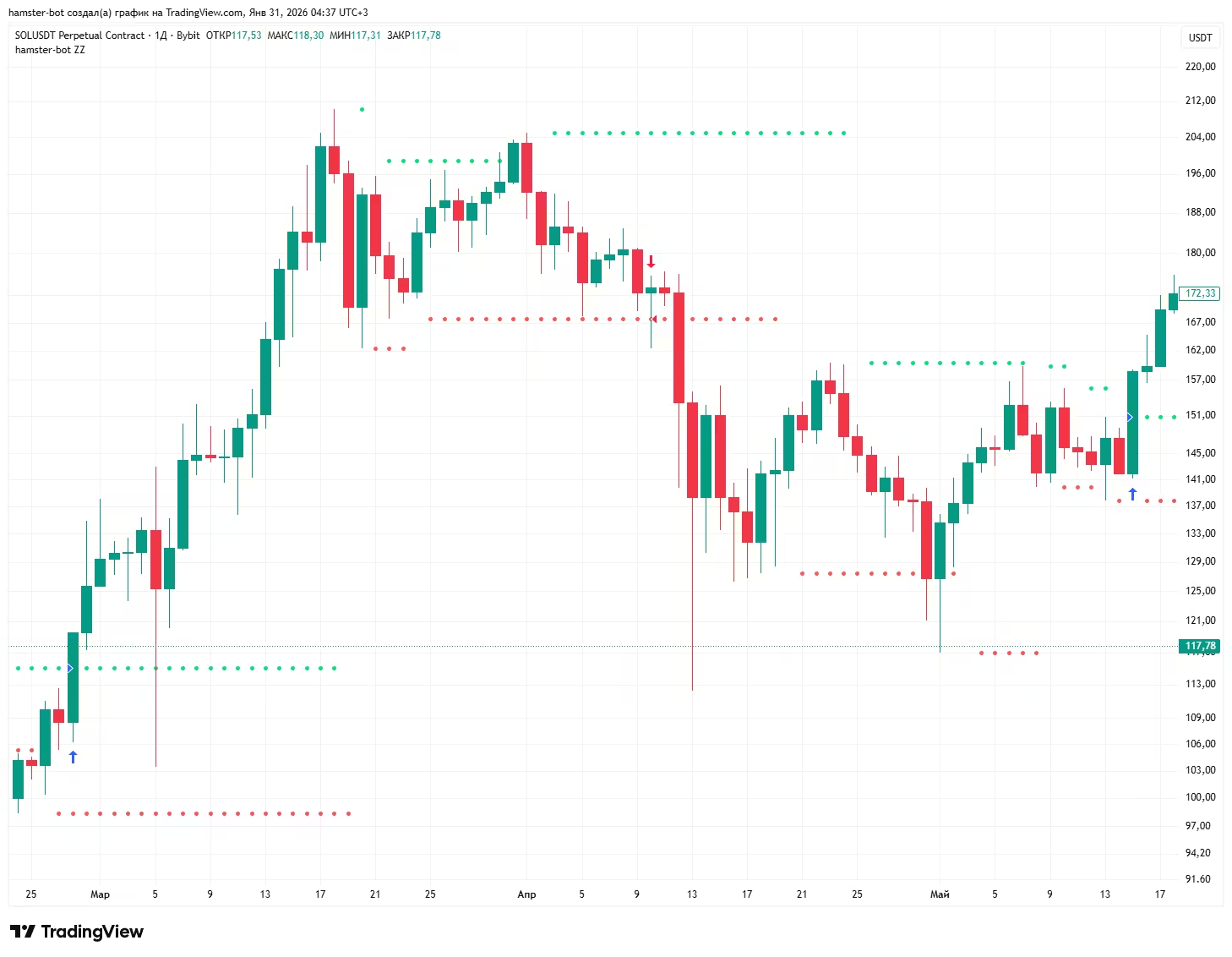
● Green marks where the conditional buy order is placed: a breakout of the last significant high.
● Red marks the sell order: the price breaks the last low.
After the strategy starts, if there is no position and the price is between the levels, 1 order to open a long position and 1 order to open a short are placed. If the price is not between the levels or there is an open position, 1 order is placed.
If a position is open, the strategy keeps only 1 order. By default its size = position size * 2, so that it flips the position (closes it and opens a new one of the same size).
Strategy Trend Zig Zag and ZZ - what is the difference
Strategy Trend Zig Zag (zigzag, selected by default when a bot is created) - a simple version with a minimum of settings, the counterpart of the «Simple trend strategy» script on TradingView.
Levels are built the same way as in ZZ2, and the position is flipped by stop orders. The modifiers and filters from the «Parameters and modifiers» block are not used in it.
length- reversal search depth (default 5)detection- length of the smoothing EMA (default 3)
ZZ (zz) - the full version: two level types (ZZ2 and ZZ6) and all the modifiers, filters and position size settings described below.
Level types: ZZ2 and ZZ6
ZZ2 (default) - levels are built from the reversal points of the smoothed price. The algorithm is explained in detail in the «For the curious» block.
depth - reversal search depth (default 5)
detection, detection_type, detection_source - length, type (EMA by default) and price source of the smoothing line whose reversals define the points
rsi_len, rsi_value - an additional RSI condition for a reversal point. Not used when rsi_value = 0
ZZ6 - levels are built from two high/low channels: a fast one of length zz6_len and a slow one of length zz6_len_slow (if not set, zz6_len * 3).
A level is fixed when the fast and slow channels coincide (the price made a new extreme) and the fast channel starts to turn.
In ZZ6 the position size depends on risk: the wider the distance between levels (and so the farther the stop), the smaller the lot.
zz6_risklong,zz6_riskshort- risk per trade in %. Lot = base lot * (risk % / distance between levels in %)zz6_risk_one- use the same risk for short as for long (zz6_risklong)zz6_risk_max- upper limit for this lot multiplier
Parameters and modifiers
Operating mode
reverse- reverse (counter-trend) mode. When the upper level is broken the bot opens a short, when the lower level is broken - a long. Orders in this mode are market ordersalways_in_position- if there is no position and the price has already moved beyond a level (for example after closing by stop or take profit), the bot enters immediately with a market order in the direction of the breakoutone_entry_long,one_entry_short- one entry per new level. If the position from a level has already been closed (for example by take profit or stop), the bot does not enter again on the same levelsingle_entry- strengthens the previous option: the ban on re-entry is lifted not by a new level but only after an entry in the opposite direction
Level settings
level_offset_long,level_offset_short- shift the level by a fixed price amountlevel_multiplier_long,level_multiplier_short- shift the level in percent. 1 - no shift, 1.01 - 1% higherangle_long,angle_short- level slope. The level is multiplied by this value on every new candle and gradually moves toward the price. 1 - a horizontal level
Entry filters
When a filter blocks an entry, the bot does not open a new position, but the order to close the current position at the opposite level stays in place.
use_distance_filter,distance_filter- do not enter if the distance between levels is greater than the given % (the stop is too far)use_flat_filter,flat_filter- do not enter if the distance between levels is less than the given % (a sign of a sideways market)use_narrowing- trade only when the levels are narrowing: the last high is lower than the previous one and the last low is higher than the previous oneuse_ma_filter,ma_filter- do not flip if the fast MA has already moved away from the slow MA by more than the given % against the new directionuse_ma_distance_filter,ma_distance_filter- do not enter if the fast and slow MAs are closer to each other than the given % (no momentum)ma_fast_*,ma_slow_*- type, length and source of the fast and slow MA for the two filters abovefilter_only_open- the distance filters apply only to opening a position; flipping from an already open position is allowed- Trend filter (the
filterblock, shared by ZZ and HiDeep) - see the «Position closing and common options» section
Position size
use_auto_risk- auto risk for ZZ2. The lot multiplier changes smoothly fromauto_risk_coeff_starttoauto_risk_coeff_enddepending on the distance between levels: fromauto_risk_procent_starttoauto_risk_procent_end%. A narrow channel means a bigger lot, a wide one a smaller lotcount_pnl_profit,count_pnl_loss- on a flip, add the profit or loss of the current position to the size of the new onesize_control- protection against doubling: if the position accidentally becomes larger than two entries, the excess is closed with a market order
Position closing
use_tp_between_levels,tp_between_levels_value- close the position in profit if the price has returned inside the channel between the levels and the profit is at least the given %stop_by_new_level- stop at a new level. If after entry the price broke a new level in the direction of the position and then came back to it, the position is closedclose_on_wrong_side- close the position if the price has gone beyond the opposite level by more than 1% (for example the stop order did not trigger because of a gap)use_close_on_levels_crossing- close the position if the levels have crossed (the upper one became lower than the lower one)from_level_price- calculate take profit and minimum profit from the level price instead of the actual entry price
Backtest
Test in the built-in backtester
A PineScript script for testing the strategy on historical data in the TradingView strategy tester:
Recommendations:
(not strict, you can break them for research purposes)
Working timeframe: 4h and higher.
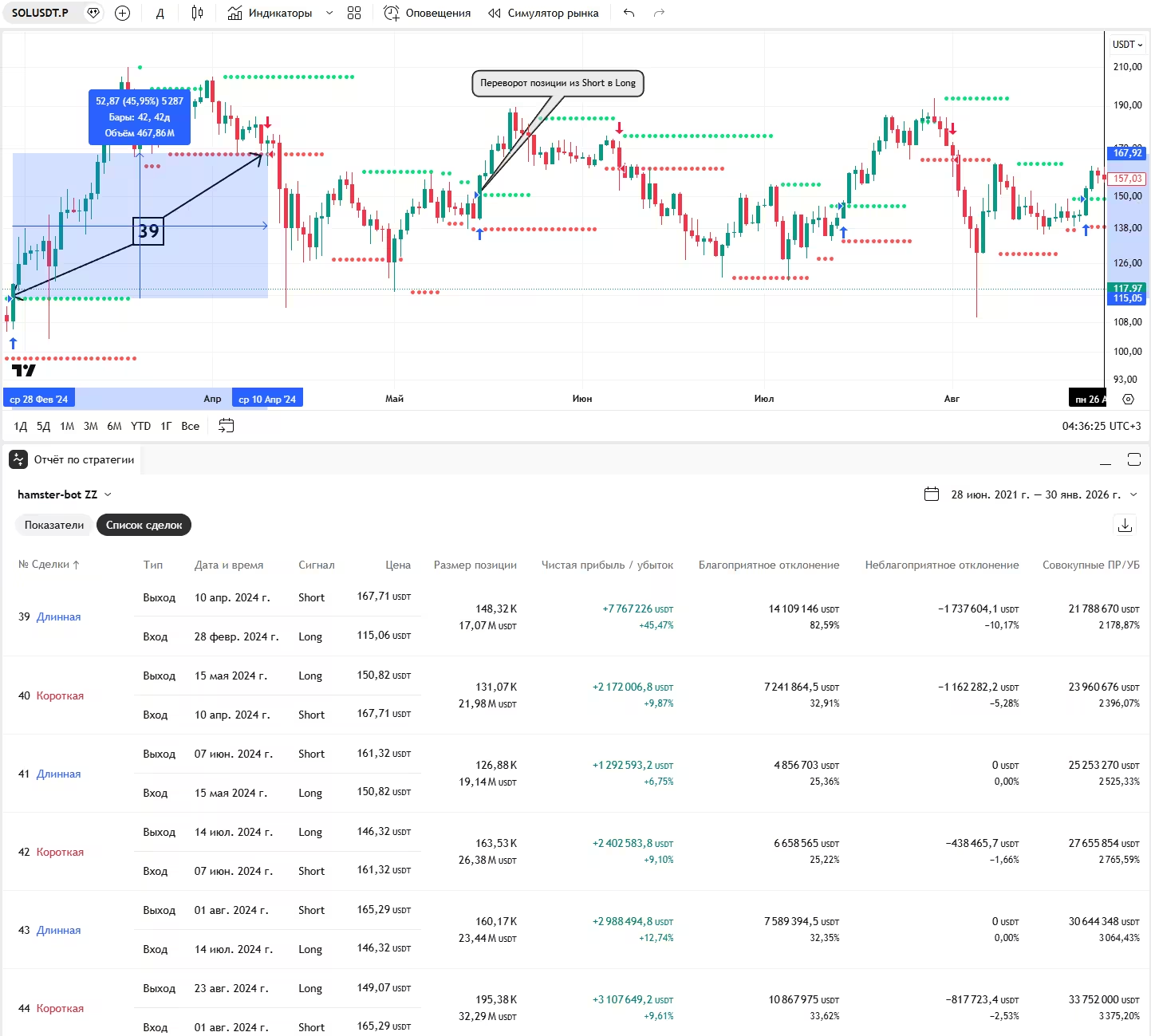
For the curious
The level-building algorithm of the ZZ2 strategy. It does not use the standard ZigZag indicator. The code shows how simple it is and that repainting is ruled out. But the levels are built with a delay of a few candles (this does not hurt the strategy at all)

Three sequentially smoothed EMAs are used. This gives strong smoothing and reduces noise.
The variable z records reversal points. If the EMA turns up → a local low (l) is taken. If it turns down → a local high (h). These points (l and h) become the basis for building the levels.
ZigZag Double, ZigZag MarketOrder, ZZ-Double-Market-Filter
ZigZag variants with separate settings for long and short. The buy level is built from one ZigZag (long_length, long_detection),
the sell level from another (short_length, short_detection). For example, you can enter long on more sensitive levels and short on coarser ones.
The bot runs the strategy over history and keeps a "virtual position". If by history a position in this direction is already open (for example, the real position closed by take-profit or stop), no repeated entry in the same direction is made - the bot waits for the next signal.
- ZigZag Double (
zigzag_double) - entry and reversal with stop orders at the levels, as in Strategy Trend Zig Zag - ZigZag MarketOrder (
zigzag_marketorder) - the same levels, but entry with a market order when a candle has crossed the level and the price is beyond it. The reversal is also a market order - ZZ-Double-Market-Filter (
zz-double-market-filter) - ZigZag MarketOrder with a built-in screener: entries are allowed only after a price and volume impulse (see parameters below)
As in the other ZigZag strategies, the position is closed if the levels cross (the upper below the lower) or the price moves beyond the opposite level by more than 1%.
Parameters
long_length,long_detection- reversal search depth and EMA length for the long level (default 5 and 3)short_length,short_detection- the same for the short level (default 5 and 3)
ZZ-Double-Market-Filter only
screener_up_threshold_pct,screener_bars_back- screener signal: the price has risen by the set % from the lowest close of the lastscreener_bars_backcandles (default 5% over 3 candles). 0 - the screener never triggersscreener_use_24h_vol_filter,screener_min_24h_vol_usdt- additionally require a 24h turnover of at least the set amount in USDT (default 1 000 000)screener_use_vol_growth_filter,screener_vol_growth_candles,screener_vol_growth_threshold_pct- the current candle's volume must exceed the lowest volume of N candles by the set % (default 15 candles, 50%)screener_use_low_filter- enter long only if the current candle touched the leveluse_tema_filter,tema_length,tema_src- TEMA trend filter (default 200, close): long only when TEMA is rising, short only when it is falling
When the screener triggers, the "gate opens" for the bot and one trade on ZigZag signals is allowed. After that trade closes, the gate closes until the next screener signal.
Donchian Channel
The classic Donchian channel breakout strategy. The upper channel border is the high of N candles, the lower one is the low of N candles, the center is midway between them.
Entry: a stop buy order at the upper border and a stop sell order at the lower one. Entry orders are placed only after the price has returned to the channel center.
This protects against entering an already stretched move right after the previous trade.
Exit: stop-loss - a stop order at the channel center, take-profit - a limit order a set % beyond the channel border. The stop and take levels move together with the channel.
⚠️ Like any breakout strategy, it loses in a sideways market: the price touches the border and returns to the center.
Order type used: Market Stop order (entry and stop) and Limit (take-profit).
Parameters
channel_len- channel length in candles (default 25)use_tp,tp- enable the take-profit and its offset in % from the channel border (default 10%)- If the price has moved beyond the opposite channel border by more than 1%, the position is closed with a market order (protection against gaps)
Backtest
Test in the built-in backtester
The script code (PineScript) for the TradingView strategy tester "[TV] Donchian Channel" is available in the bot interface on the strategy page.
[TV] Channel Close Strategy
The simplest version of a Donchian channel breakout, with a single parameter. A good way to get started with trend strategies.
When a candle closes above the high of the previous N candles - buy. When it closes below the low - sell. The position is reversed.
All actions happen at the candle close with a market order, so the strategy works the same in the tester and on the live market.
⚠️ Loses in a sideways market and on false breakouts.
Parameters
len- channel length in candles (default 10)- If the price has moved beyond the opposite channel border by more than 1%, the position is closed with a market order
RiskTurtle (Donchian Channel + risk management)
A development of the "turtles" idea: entry on a breakout of the slow Donchian channel, protective exit at the middle of the fast channel.
The main difference is that the position size is calculated from risk. The distance from the entry point to the middle of the fast channel is the potential loss. The bot sizes the position so that this loss equals the set % of the deposit. A narrow channel means a bigger position, a wide one a smaller position.
Order type used: Market Stop order.
Parameters
slow_channel_len- length of the slow channel whose borders are used for entry orders (default 50)fast_channel_len- length of the fast channel whose middle is used for the protective close (default 25)risk_long,risk_short- risk per trade in %risk_max- maximum lot multiplier, so that the position does not get too big on a very narrow channellevel_offset_long,level_offset_short- shift of the entry levels by a fixed amount in price
Moving Average Crossover, Price vs MA, MACD Trend
Three classic trend strategies based on moving averages. All actions are market orders on a chart signal. The opposite signal closes the position (without reversing), and a new position opens on the next signal.
- Moving Average Crossover (
movingaveragecrossover) - the fast MA crossed the slow one upwards - buy, downwards - sell - Price vs MA (
pricevsma) - the close price crossed the MA upwards - buy, downwards - sell. You can enter not only at the moment of the crossover but on any candle while the price is on the right side of the MA - MACD Trend (
macdtrend) - the MACD line crossed the signal line upwards - buy, downwards - sell. A trend filter can be enabled
⚠️ Like any MA trend strategy, they lose in a sideways market because of frequent false crossovers.
Parameters
Moving Average Crossover
fast_ma_type,fast_ma_source,fast_ma_len- fast MA (default EMA, close, 9)slow_ma_type,slow_ma_source,slow_ma_len- slow MA (default EMA, close, 21)
Price vs MA
ma_type,ma_source,ma_len- MA (default SMA, close, 200)use_cross_entry- enter only at the moment of the crossover (default). If off - enter on any candle when the price is above the MA (long) or below it (short)
MACD Trend
ma_source,fast_len,slow_len,signal_len- price source and EMA lengths for MACD (default close, 12, 26, 9)use_trend_filter- long only in an uptrend, short only in a downtrend. Works together with the enabled trend filter blockfilter(see "Trend filter")
Common to all three
count_max- maximum number of entries into the position, including the first (default 1 - no adding). Adding happens on a repeated signal in the same direction (in Price vs MA - only withuse_cross_entryoff)entry_gap- minimum step for adding: the next entry only if the price is below the previous entry price *entry_gap(for long; mirrored for short). For example 0.98 - no closer than 2%. 0 - no limit
DoubleDragon (experimental stage)
This is the same ZigZag strategy, but used a little differently. The whole difference is that we look at the backtest on the chart of the ratio of two coins XXXUSDT/xxxusdt.
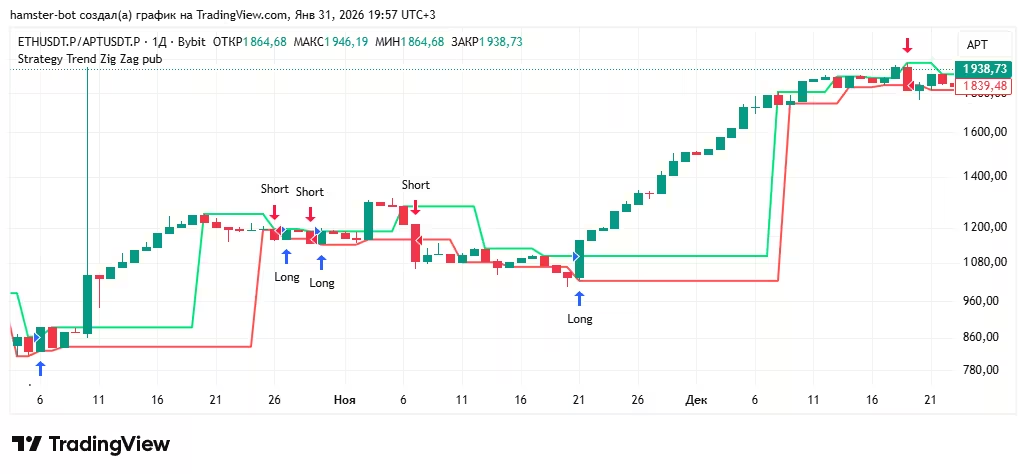
Where a Long position opens on the synthetic chart in the strategy tester, on the real market a Long opens on XXXUSDT and a Short on xxxusdt.
Where a Short position opens, on the real market a Short opens on XXXUSDT and a Long on xxxusdt.
Parameters
The strategy runs two bots - one for each coin of the pair. The levels are built on the synthetic price ratio chart and calculated with the settings of the first bot.
index- which coin of the pair this is: 1 - numerator (XXXUSDT), 2 - denominator (xxxusdt)strategy- which levels to trade the synthetic chart on:zigzag(default) ordonchianzigzag- ZigZag settings block:length,detection,detection_source(as in Strategy Trend Zig Zag)donchian- Donchian channel settings block:channel_len,use_tp,tp,detection_source(as in Donchian Channel)reverse- reverse mode: trade directions are swapped
Backtest
Test in the built-in backtester
Script (PineScript) for testing the strategy on historical data in the TradingView strategy tester:
But as the input in the strategy tester we choose a synthetic chart instead of a single trading pair.
The synthetic ratio chart BYBIT:XXXUSDT.P/BYBIT:xxxusdt.P (where XXX is any cryptocurrency priced higher than xxx)
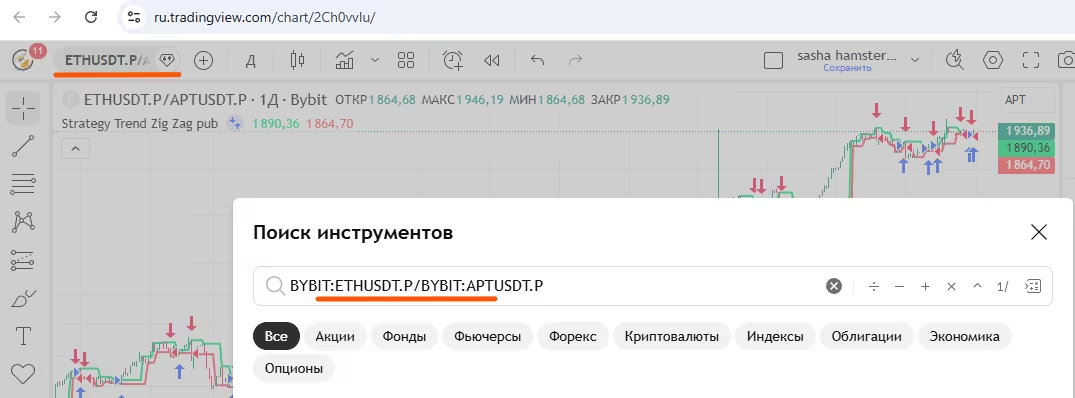
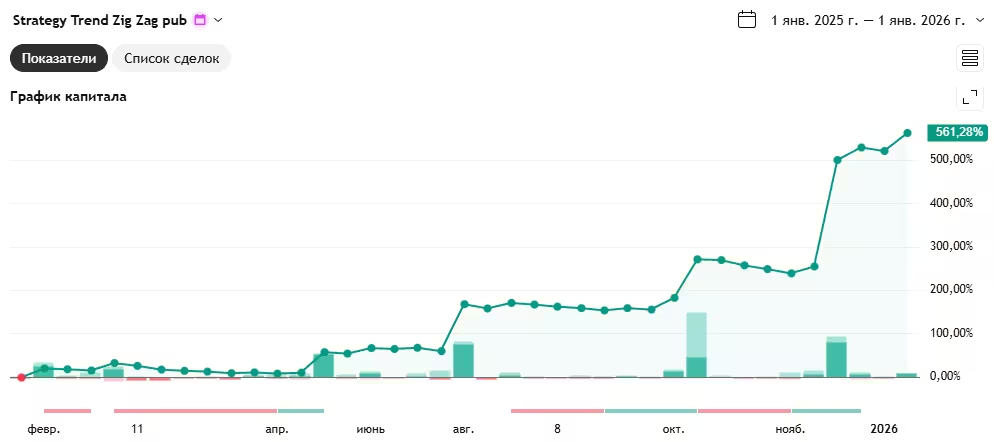
Strategy tester result for 2025, BYBIT:ETHUSDT.P/BYBIT:APTUSDT.P on the 1D timeframe:
Counter-trend strategies:
Mean reversion | MRS strategy (Envelope, ShiftMA, MultiMA, Colorbox)
MRS - Mean Reversion Strategy. It is a counter-trend strategy based on the assumption that the price returns to its average after deviating from it. The opening order is placed at an offset from the average price. The closing order is placed at the average price without an offset. On a sharp price deviation a position opens, and it closes when the price returns to the average.
Trades are generated when the price moves away from the average by a certain percentage. ⚠️ But if the price keeps moving in the same direction without a pullback, the position will be at a loss. The price falls - the strategy buys (going against the trend). The price rises - it sells (also against the trend). But sooner or later the close happens at the average price anyway.
As a rule, positions in this strategy are held briefly. And in a calm market you can stay without a position for a long time.
Order type used: Limit. Placed in advance and moved as the average price changes.
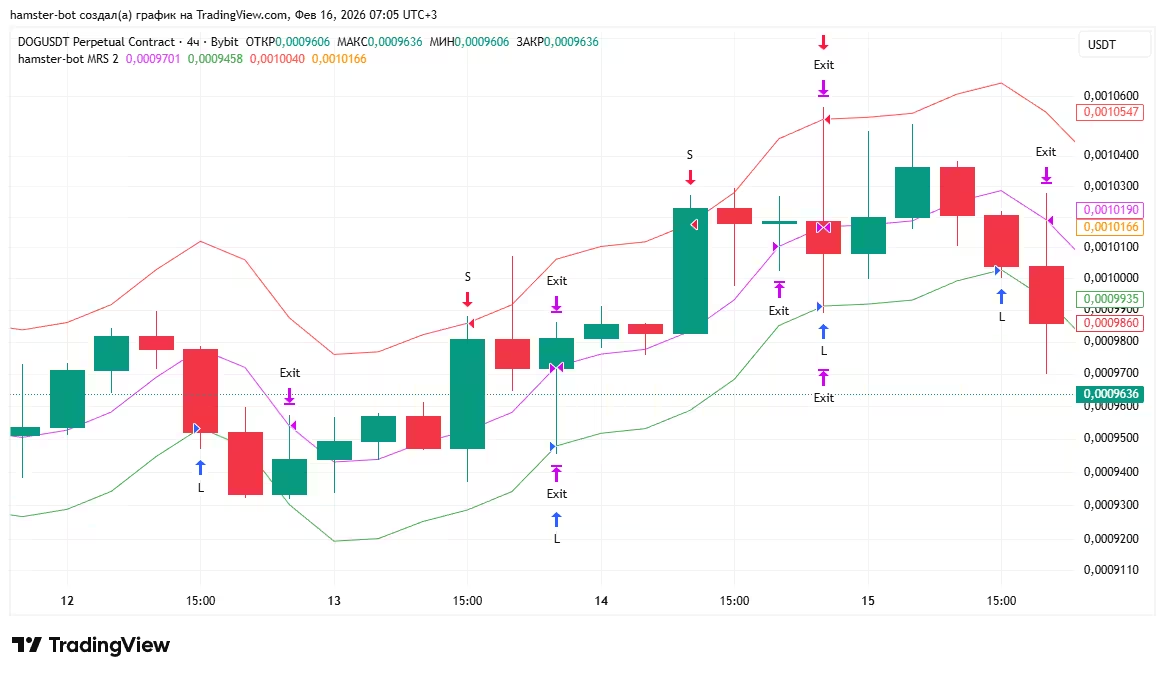
In the simplest form there are three MA lines (moving averages) on the chart.
● The Fuchsia base MA shows the price of the closing limit order. No offset
● The Green long MA - the price of the limit BUY order that opens a LONG position. It is the base MA shifted down by a %.
● The Red short MA - the price of the limit SELL order that opens a SHORT position. It is the base MA shifted up by a %.
How it works: if both long and short are on, 2 orders are placed. If only long or short is on, 1 order. While waiting for a position, the orders move along their lines on every new candle. When the price reaches our opening order, a position opens and a closing order is placed at the base MA. The closing order also moves along its MA until it is filled. Then the cycle repeats.
MA line settings (opening and closing orders)
There can be several opening lines for each side (ma_long, ma_short) - this gives a grid of orders with averaging in (MultiMA).
There is one closing line for each side (ma_close_long, ma_close_short) - the whole position is closed with one order.
- id - line sequence number, no repeats
- type - moving average type
SMA, EMA, GMA, HARMONIC, TEMA, DEMA, ZLEMA, WMA, VWMA, RMA, EHMA, THMA, HMA, DMA, ATR, H, L - source - price source
open, high, low, close, hl2, hlc3, ohlc4, hlcc4, oc2 - len - MA length
- multiplier - offset. 1 means no offset, 0.99 means -1%, 1.01 means +1%
- lot_x - lot multiplier: order size = base lot * lot_x. Not used for the closing order
- order_type -
limitormarket. A market order is sent when the price reaches the line - post_only - limit order as maker only
- hidden - hidden limit order (BitMEX only)
Lot setup. In the basic settings set balance_percentage = 100 and risk = 1. Then lot_x = 1 - an order for 100% of the balance, 0.5 - for 50%, 1.5 - for 150%.
Strategy parameters
entry_on_close- for market opening orders: check the entry condition against the last candle's close price instead of the current pricetrade_offset- for market opening orders: take the MA value N candles backreverse_mode- for market opening orders: enter not when the price crosses the line, but when the price is above the line (for a buy) or below it (for a sell), no further than 1% from itrecalculate- recalculate order sizes on every update, even if a position is already openclose_on_signal- starting from the second candle after entry, close the position with a market order as soon as the price touches the closing lineclose_on_wrong_side- if the price has moved beyond the closing line by more than 0.5% and the limit order was not filled, close the position with a market orderemergency_stop- emergency stop: if the opening line ends up on the other side of the closing line (the lines crossed), the bot cancels all orders and closes the positionnotification_trade_report- a Telegram report for each closed trade: average entry price, exit price and the result in %position_priority- position priority for the position limiter (see below)
Position limiter
The limiter is set for an API key with the "open_positions_limiter": 64 parameter in the key file in the settings_account folder. Default 0 - off.
Only MRS bots whose position_priority is not 0 take part in the limiter.
position_priorityfrom 1 to 5. 5 is the lowest priority, such a position closes first- If there are as many open positions as set in the limiter, opening orders are cancelled on pairs without a position - no new positions are opened
- If more positions opened than the limit (for example at the same time), the extra ones are closed: first with priority 5, then 4, 3, 2, 1. With equal priority - a random one
- Positions with priority 0 are not counted and not closed by the limiter
In the interface the limiter is shown like this: [100 | (4/64)] - 100 bots on this API, 4 positions open, limit 64.
The same open_positions_limiter parameter also limits the HiDeep, RedFlag, SmartProfit and ShadowOverlap strategies: when there are as many open positions on them as the limit, bots without a position do not open new trades. Priorities are not used for them.
ColorBox - close on the N-th candle
A closing option that turns MRS into ColorBox: the position closes at the close of the N-th candle after entry. You can add a candle color condition, for example close after the 2nd green candle. Set separately for long and short. Details are in the "Position closing and common options" section.
Backtest
Test in the built-in backtester
Script (PineScript) for testing the strategy on historical data in the TradingView strategy tester. The strategy is popular, and you can find many variations under different names.
-
Links:
- A simple version of the strategy with a minimum of settings. I recommend starting with this script.
- A script with a large set of parameters that can be reproduced in the trading bot.
- A script that can place many opening orders (increasing the position | averaging in).
Recommendations:
(not strict, you can break them for research purposes)
● A limit order limits the strategy's capacity. On low-liquidity instruments the tester result will be overstated.
● On spot, test long only. Long and short at the same time is for experienced users.
● On futures a counter-trend strategy carries a liquidation risk.
● Typical timeframe - 1h. Altcoin/bitcoin or altcoin/altcoin pairs.
MRS2, MRS2 FAST
A version of MRS with separate closing lines for long and short and a set of filters that cancel orders at dangerous moments. One opening line per side, no averaging in.
Order type used: Limit. The opening and closing orders move along their own lines.
By default the bot does not trade if the opening line ends up on the other side of the closing line (for example, the buy line is above the long closing line) - such a trade is a loss from the start.
Parameters
ma_long,ma_short,ma_close_long,ma_close_short- opening and closing lines. Configured the same way as lines in MRSuse_settings_from_open_long,use_settings_from_open_short- build the closing line with the type, source and length of the opening MA (the offset is taken from the closing line)distance_filter- minimum distance in % between the opening and closing line (default 0.3). If closer, orders are cancelled (the potential profit is too small)filter_pump_1- post-pump filter. When the price (source) crosses the closing line upwards, the level of that lineoffsetcandles back is remembered. While the buy line is above this level, the bot does not buyfilter_pump_2- sharp rise filter. If over the lastcountcandles the high isvaluetimes bigger than the low and the high came after the low, trading is pausedfilter_close_position- when a filter triggers, not only cancel orders but also close the open positionunconditional_placement- always place orders, without checking the relative position of the linesallow_close_by_market_order- if the whole candle went above the closing line and the limit order was not filled, close the position with a market orderonly_profit- do not move the closing order below the entry price (for long) - close only in profitreplace_open_order- with an open position, the size of the opening order is reduced by the position sizecancel_if_half_filled- if the opening order is partially filled and the remaining part is less than twice the position, it is cancelled
MRS2 FAST (mrs2fast) - the same logic and the same settings (the mrs2 block), but in one pass the bot performs all the needed order actions at once (update the closing order, move the opening order, etc.) instead of one action per pass. Orders keep up with the MA lines faster - useful on lower timeframes and with many bots.
MRS3
A combination of MRS and MRS2: several opening lines on each side (a grid of orders with averaging in, like MultiMA in MRS) and the set of protections from MRS2.
Order type used: Limit. Each opening order moves along its own line, the closing order moves along the closing line.
Parameters
ma_long,ma_short- lists of opening lines. Configured the same way as in MRS (id, type, source, len, multiplier, lot_x, order_type, post_only, hidden)ma_close_long,ma_close_short- one closing line per sidedistance_filter,filter_close_position,unconditional_placement,allow_close_by_market_order,only_profit- as in MRS2replace_open_order- with an open position, the position is spread across the grid levels starting from the one nearest to the price: filled levels are not re-placed, a partially filled level gets the remainder, untouched ones get the full lotuse_id_tracking- track grid orders by ID (no more than one request to the exchange per pass). Useful when the exchange limits request ratesnotification- a Telegram report for each closed trade: entry price, exit price and the result in %
HD, HiDeep
This strategy came out of long thinking about how to improve the mean reversion | MRS | Envelope strategy, and those improvements turned into a separate strategy.
Key fundamental differences from MRS:
● works only with market orders. The price at which the buy/sell will happen is not known in advance, so nothing can be placed ahead of time
● all actions happen at the moment the candle closes. This gives a very simple, robust strategy logic that backtests very well even in primitive strategy testers
● a non-obvious consequence of the point above - much better survival of the strategy during sharp moves within a single candle. Nothing happens inside the candle, even if the candle makes an 80% price move.
● the strategy uses the MRS logic as one of the conditions (a filter) for triggering an order.
● unlimited averaging in.
It is a counter-trend strategy that looks for moments of local oversold conditions and opens buys on pullbacks down, expecting a subsequent bounce.
It combines:
● entry filtering with a moving average (as in the strategy above - Mean reversion | MRS)
● analysis of the price deviation from the average
● a simple oversold model (similar to RSI). The price falls faster than usual.
● exit on signs of price recovery (the mirror-opposite of the buy conditions)
The strategy tries to catch a situation where:
● The price has dropped sharply
● The move looks "overloaded" (too strong compared to normal)
● There are signs of short-term oversold conditions
At such moments it assumes the market has temporarily overshot downwards and may bounce.
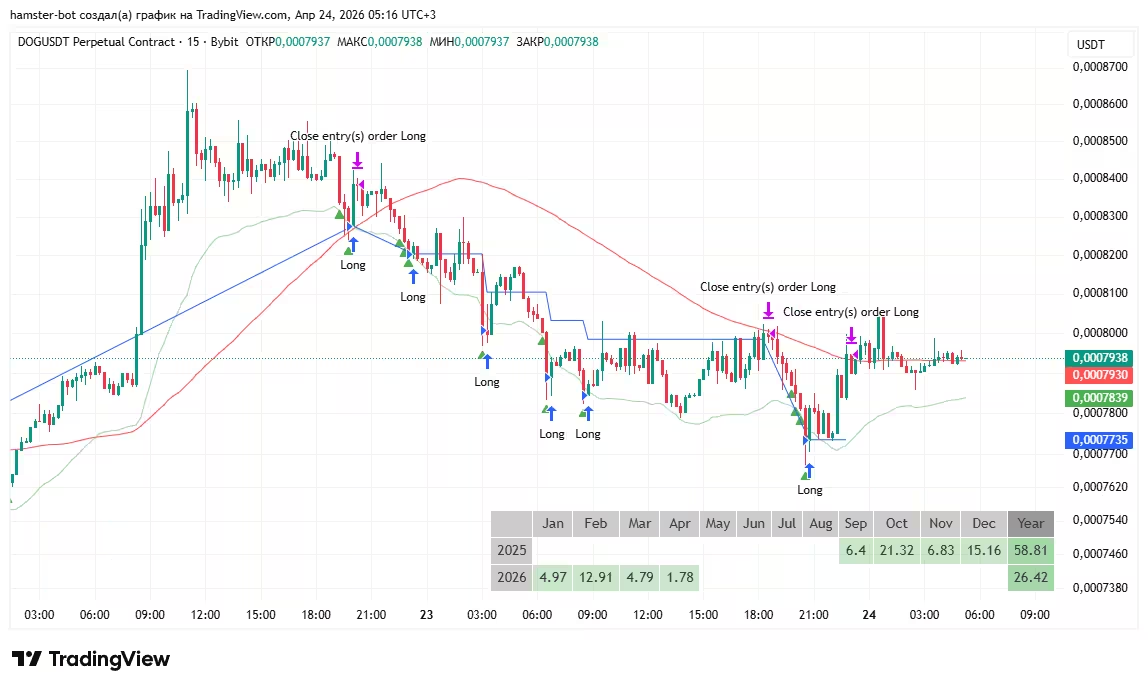
An example of a HiDeep strategy variation on the chart above.
Long entry and subsequent averaging in on candles that are:
● below the green trigger MA line shifted down
● marked with a green triangle ▲
The position closes when the High touches the red MA line. (action at the candle close)
The blue line shows the average buy price.
⚠️ In a prolonged decline without a bounce, the position keeps growing through averaging in and the loss grows. Limit the number of averaging entries and the lot size.
How the signal is determined (green/red triangle)
A buy signal (green ▲) appears on a candle that at the same time:
● is red (closed below its open)
● has its body below the body of the previous candle
● has a deviation of the close price from the SMA larger than the average deviation over recent candles (the move is "overloaded")
● has a fast RSI below 10 (strong short-term oversold)
A sell signal (red ▼) is the mirror: a green candle, body above the previous one, a strong upward deviation, fast RSI above 90.
Signals are calculated with two independent sets of settings, and either one triggers. In addition, the close price must be below the MA low line (for a buy) or above MA high (for a sell).
Parameters
MA lines
ma_low_*,ma_high_*- type, length and source of the entry filter lines. ATR can be used instead of an MAma_low_1,ma_high_1- offset of the filter lines. 0.995 - 0.5% lower, 1.011 - 1.1% higherma_high_trigger_*,ma_low_trigger_*- closing trigger lines: long closes when the candle High is abovema_high_trigger, short when the Low is belowma_low_trigger
Signal
up_1,dn_1,mac_1,sma_1,sma_up_1,sma_dn_1- first set: fast RSI length up/down, SMA length for the deviation, deviation averaging length, threshold multipliersup_2...sma_dn_2- second set with the same parameters
Averaging in and closing
count_max_long,count_max_short- maximum number of entries into the position, including the first (default 5)entry_gap- minimum averaging step: the next buy only if the price is below the previous buy price *entry_gap. For example 0.98 - no closer than 2%. 0 - no limitonly_profit,min_profit- close on the trigger line only in profit.min_profit- multiplier to the entry price, e.g. 1.01 - profit of at least 1%allow_reduce- close the position on the opposite signal (for long - on the red ▼)reduce_ma_1- close on the opposite signal only if the price is beyond the opposite MA lineallow_reverse- on the opposite signal, reverse the position instead of just closing it
Modes
use_pdd- inverted mode: buy on an overbought signal above theMA highline, sell on an oversold signal belowMA low. The strategy becomes a momentum strategydisable_trade_on_reverse_trend- with the trend filter enabled, do not open trades on the candle where the trend changeduse_auto_size_hedge,auto_size_hedge_ratio- automatic size for hedging. The entry size depends on the total size of trend positions of other bots on this account: the more trend shorts, the bigger the HiDeep buy, and vice versadelay- pause between checks in ms (at least 3000)
The bot starts trading only when enough candles are loaded to calculate the indicators. With the trend filter enabled, at least 500 candles are needed.
Backtest
Test in the built-in backtester
Scripts (PineScript) for testing the strategy on historical data in the TradingView strategy tester. The hamster-bot-HiDeep script contains three different variants of the strategy - pick the one you need with a preset in the settings.
RedFlag
A simple strategy that buys a sharp drop. Works only long.
The bot watches the current candle. If the candle is red and the price has dropped by the set % from the previous candle's price (open, high, low or close, your choice), the bot buys with a market order right away, without waiting for the candle to close. If the drop continues, it averages in.
Order type used: Market (entry) and Limit (take-profit).
⚠️ In a prolonged decline without a bounce, averaging in increases the loss. Limit the number of entries.
Parameters
drop_percent- how many % the price must drop to enter (default 10%)from- which price of the previous candle to measure the drop from:open,high,low,closecount- maximum number of entries, including the firsttimer- minimum pause between entries in minutes. 0 - no pauseeach_tp- each entry gets its own limit take-profit attake_profit_long% from that entry's price. Without this option there is one take-profit for the whole position
SmartProfit
A long-only averaging (DCA) strategy. The bot buys with a market order, immediately places a grid of limit orders to average in below the entry price and a limit take-profit from the average position price. After the take-profit closes the position, the cycle repeats.
Entries can be limited by filters: buy only when the price is below a chosen Bollinger line, below an MA or below a set maximum price. Also works on spot - the bot calculates the average entry price from filled orders.
Order type used: Market (first entry) and Limit (averaging in and take-profit).
⚠️ In a prolonged decline below the whole grid, the position stays at a loss. Size the grid and the martingale to your deposit.
Parameters
take_profit- take-profit in % of the average position price (default 2)averaging- averaging levels in % below the first entry price, separated by semicolons (default3;6;9)martingale- lot multiplier for each next averaging order (default 1 - all orders the same size)filter_bb- Bollinger Bands filter:use,len,type,source,std_dev,condition- which line the price must be below:upper,basisorlowerfilter_ma- MA filter:use,type,len,source,multiplier. Buy only when the price is below MA *multiplierfilter_max_price- do not buy above this price. 0 - offonly_exit- exit mode: no new cycles are opened, the bot only closes the current positiontrade_on_exit_bar- allow a new entry on the same candle where the previous position closed (on by default)
ShadowOverlap
A strategy that trades a bounce off a long candle wick. If a candle has a long upper wick, a short level is built at a set part of that wick. When the price returns to this level a few days later, the bot opens short expecting another bounce. For long - mirrored on the lower wick.
Exit in parts: two partial take-profits and a final take-profit, plus a stop-loss and moving the stop to breakeven.
Order type used: Market or Limit (entry), Limit (take-profits) and Stop (stop-loss).
Parameters
Settings are set separately for the short and long blocks:
percent_input- minimum wick length in % of the price at the edge of the candle body (default 5)wick_level_percent- at which part of the wick the entry level is built: 0% - edge of the body, 100% - end of the wick (default 90)size_candle- enter only if the distance between the level and the current price is more than the set % (default 7)days_to_wait- how many days must pass after the level appears before it can be traded (default 1)use_new_filter,wick_level_percent2- trade only a "fresh" level: if the price has already reached thewick_level_percent2% level of the wick (default 20), the level counts as used uptp1_dist,tp1_qty- first take-profit: distance in % from the entry price and share of the position in % (default 4% and 70%)tp2_dist,tp2_qty- second take-profit (default 6% and 15%)tp3_dist- final take-profit for the rest of the position (default 9%)sl_dist- stop-loss in % of the entry price (default 18)no_loss_trigger,no_loss_value- breakeven: when the profit reachesno_loss_trigger%, the stop is moved into profit by (no_loss_trigger-no_loss_value) %. 0 - off
Common settings:
use_market- enter with a market order when the price reaches the level (default). If off, a limit order at the level is placed in advance when the price comes closer thansize_candle%notify_only- signal mode: the bot does not trade, it only sends entry and exit notifications to Telegram
TV MAPM
A strategy on the crossover of two MACD signal lines, with averaging in and a take-profit. MACD is calculated as the difference between EMA 8 and EMA 49, and fast and slow signal lines are built from it. The fast line crossed the slow one upwards - buy, downwards - sell.
After entry, a limit take-profit is placed from the average position price, plus a limit order to average in at a step from the first entry price.
Each next averaging order is lot_x times bigger than the previous one.
Order type used: Market (entry) and Limit (averaging in and take-profit).
Parameters
fast_len,slow_len- lengths of the fast and slow signal lines (default 300 and 600)averaging_step- averaging step in % of the first entry price (default 2.5)max_entry_count- maximum number of entries, including the first (default 3)lot_x- lot multiplier for each next averaging order (default 1)tp_long,tp_short- take-profit in % of the average position price (default 10)
MZ
A strategy that enters on a pullback after an impulse. The bot remembers the local low (for long) and builds levels from it at set fractions of the channel size channel_size.
When a candle closes above the trigger level (the impulse is confirmed), a limit buy order is placed on the pullback, with a take-profit above and a stop-loss just above the local low.
For short - mirrored from the local high.
Trades in one direction: if long is enabled in the basic settings - long only, otherwise short only. After a losing trade the lot of the next one can be increased (martingale).
⚠️ Martingale quickly increases risk during a losing streak.
Parameters
channel_size- channel size in price units (default 10000 - adjust it to the coin price)mul_trigger- trigger level: fraction of the channel from the local low (default 0.1)mul_limit_1- level of the limit entry order (default 0.05)mul_tp_1- take-profit level (default 0.5)mul_control- control level: if the price reached it and came back to the entry level, the position is closed (default 0.25)mul_sl- stop-loss: offset from the local low as a fraction of the price (default 0.001 = 0.1%)martingale- lot multiplier after a losing trade (default 1 - off)
Trading on TradingView signals:
TradingView | Alerts | Webhook
If your strategy is not on the list but you have it in TradingView, the bot can trade on its alerts. The bot receives a signal via webhook and opens or closes a position on the exchange.
The difference from the strategies above: the bot does not calculate signals itself, it executes what TradingView sends. Reaction speed depends on alert delivery.
Detailed alert setup guide: TradingView alerts
Webhook (signals for many coins)
A mode for an external screener or your own signal service: one bot trades all USDT coins on the account at once.
A signal arrives as a POST request to the bot's /w address as JSON with the fields secret (the bot's secret link), symbol (the coin, e.g. BTC) and side (buy or sell).
The bot opens a position with a market order.
link- the secret that must arrive in thesecretfield. Generated automaticallymax_positions- maximum number of positions open at the same time (default 10). A new signal is not executed for a coin that already has a positionallow_trade_minutes- after a trade on a coin, new signals for it are ignored for this many minutes (default 10)ignore_tp_sl_price- do not move take-profit and stop-loss orders already placed if their calculated price has changedskip_leverage_set- do not set leverage on the exchange before entering
Other modes:
Volume Market (building trading volume)
A mode for building trading volume (for example, for an exchange VIP level or promotion conditions). The bot alternately opens long and short with a market order and closes the position on the next candle. The bot status shows the volume traded for the day, the month and in total.
⚠️ Every trade pays the exchange fee and the spread. Use it on liquid pairs and take fees into account.
Parameters
delay_bars- pause in candles between closing a position and the next entry (default 0)use_smart_close- smart close: enables the parameters belowtp_pct,sl_pct- close earlier on a profit or loss in % of the entry price. 0 - offmax_daily_loss_pct- stop trading until the end of the day (UTC) if the balance has dropped by more than the set % of the balance at the start of the day. 0 - offthreshold_profit- profit threshold. 1 - off. Above 1 (e.g. 1.01) - close only with a profit of at least 1%. Below 1 (e.g. 0.98) - do not close if the loss is more than 2%
Long/Short-bot (experimental stage)
Entry with a limit order from the middle of the close-price channel over n candles, offset by m standard deviations; take-profit another K standard deviations further.
If the entry order is not filled within auto_cancel candles, the levels are recalculated.
n- length of the channel and the standard deviation (default 30)m- entry offset in standard deviations (default 0)K- distance to the take-profit in standard deviations (default 2)auto_cancel- after how many candles to recalculate an unfilled order (default 100)
Close Position Delete Orders
A service mode: the bot closes the open position on the pair with a market order and cancels all orders. Handy for exiting a pair quickly without deleting the bot.
The Off mode - the bot does nothing with the position and orders.
Position closing and common options:
These options are enabled in the options block of the bot settings and work with any strategy. You can enable several at once - whichever condition happens first triggers.
Take-profit and stop-loss
take_profit_long,take_profit_short- take-profit in % of the entry price. Placed as a limit order. 0 - off. Not used in MRS, MRS2, MRS2 FAST, MRS3, Donchian Channel, SmartProfit, ShadowOverlap and RedFlag witheach_tp- they have their own exitstop_loss_long,stop_loss_short- stop-loss in % of the entry price. 0 - offsl_by_order- place the stop-loss as a stop order on the exchange. Without this option the bot watches the price itself and closes the position with a market ordermarket_tp_long,market_tp_short- take-profit by market order: the bot closes the position when the profit reachesmarket_tp_*_value%. No order is placed in advance, so it is not visible in the order book
Trigger stop (breakeven)
When the profit reaches stop_trigger_trigger_long %, the stop is activated. If the price then pulls back by stop_trigger_value_long % from the trigger point, the position is closed.
Example: trigger 3%, stop 2%. The price rose 3% from the entry - the stop is active. If the price pulls back 2% from that point, the position closes at about +1%.
If the values are equal, this moves the stop to breakeven. For short use the stop_trigger_*_short parameters.
MA trailing stop
The position is closed when the price touches the moving average. For long the line is usually below the price, for short above it.
ma_ts_len_long,ma_ts_type_long,ma_ts_source_long,ma_ts_multiplier_long- length, type, source and offset of the MA for long. Length 0 - offma_ts_*_short- the same for short
MA take-profit
The opposite of the trailing stop: long closes when the price rises to the MA line, short when it falls to it. ATR can be used instead of an MA.
ma_tp_long- enable for long.ma_tp_long_type,ma_tp_long_len,ma_tp_long_source,ma_tp_long_multiplier- line settingsma_tp_shortandma_tp_short_*- the same for short
Close on MA crossover
The position is closed when the fast and slow MAs cross, if by then it has the required profit or the loss has reached the stop.
ma_crossing- enable.ma_crossing_by_crosing- close exactly at the moment of the crossoverma_crossing_fast_*,ma_crossing_slow_*- type, length and source of the fast and slow MAma_crossing_min_profit- minimum profit in % to closema_crossing_stop_loss- loss in % at which the position closes on the crossover even without profit. 0 - not usedma_crossing_skip- how many candles after entry not to check for a crossover
Close on the N-th candle (ColorBox)
The position is closed at the close of the N-th candle after entry. You can add a color condition: for example, close long after the 2nd green candle.
use_close_candle_long- enable for longclose_candle_count_long- candle number after entryclose_candle_color_long- candle color:green,redor empty - any color*_short- the same for short
Close on HiDeep signal
HiDeep signals can be used as an exit in any strategy. Long closes on an overbought signal (red ▼), short on an oversold signal (green ▲), if the profit is at least hd_close_min_profit %.
hd_close- enablehd_close_min_profit- minimum profit in % (default 0.5)- The signal is calculated using the settings of the
hdblock
Trend filter
An ATR-based filter (similar to the SuperTrend indicator). It determines the current trend and allows trades only in its direction: long only in an uptrend, short only in a downtrend.
Used in the ZZ, HiDeep and MACD Trend strategies (with use_trend_filter).
trend- enable the filtertrend_power- ATR lengthtrend_resistance- ATR multiplier. The higher it is, the less often the trend changes
Close by time
The time_close block: the position is closed with a market order a set number of candles after entry or on a set day.
enabled- enablebars_count- close N candles after entry. 0 - offuse_day_of_month,day_of_month- close on a set day of the month (1-31). Takes priority overbars_countuse_day_of_week,day_of_week- close on a set day of the week: 0 - Sunday, 1 - Monday ... 6 - Saturday. Takes priority over the other modestime_of_day- for the day-based modes: not earlier than the set UTC time inHH:mmformat. Empty - any time of dayprofit_threshold- profit condition. 1 - off. 1.25 - close only if the profit is at least 25%. 0.5 - close only if the loss is no more than 50%
Pause after a loss or a profit
The bot stops after closing a trade with a loss or a profit: it cancels its orders and stops trading until it is started again. A notification is sent to Telegram.
pause_trading_after_loss,loss_size- stop after a losing trade. Ifloss_sizeis greater than 0 - only when the loss is at least the set %pause_trading_after_profit,profit_size- stop after a profitable trade. Ifprofit_sizeis greater than 0 - only when the profit is at least the set %
Close by account margin
A setting of the API key (the close_by_margin block), not of an individual bot. When the total account balance including unrealized profit has grown relative to the wallet balance to the set level,
all bots of this key reduce their positions. This way you can lock in the overall profit across all pairs at once.
profit- threshold: 1.05 - close when the margin balance is 5% higher than the wallet balance. 1 - offsize- what part of the positions to close: 1 - 100%, 0.5 - halfeach- calculate unrealized profit from the bots' positions instead of taking the margin balance from the exchange
"Like TradingView" mode
like_tv - closing conditions are checked against the High/Low of the closed candle, the way the TradingView strategy tester does it, instead of the current price.
Helps get results on the live market close to the TradingView backtest.