 hamster-bot
TradingView webhook alerts to Telegram + chart screenshot
Telegram chat https://t.me/hbalerts In the chat you can discuss the service and test alerts. The chat will receive service messages from the bot (error log).
Webhook alerts work instantly, with no delay. The message is sent to Telegram right away. In the alert text you can pass live data https://www.tradingview.com/blog/en/introducing-variables-in-alerts-14880 (the link shows an example of how you can configure the message for yourself) at the moment the alert fires.
Instructions
- Start a chat with the bots: @hamsterhookbot and @hamsterhook_bot (the second bot is a backup, since the first one is already hitting its own limits). Use the bot @fetch_id_bot to get the id of the chat the bot should send notifications to. If it's a group chat or a channel, the bot must have permission to send messages. To get a channel id - forward any message from the channel to the bot @fetch_id_bot. Chat and channel ids start with a minus sign "-".
- In TradingView create an alert.
- Enter the webhook URL
http://164.68.120.166/alertorhttps://hamster-bot.com/alert. - Enter the message in the required format.
Message format
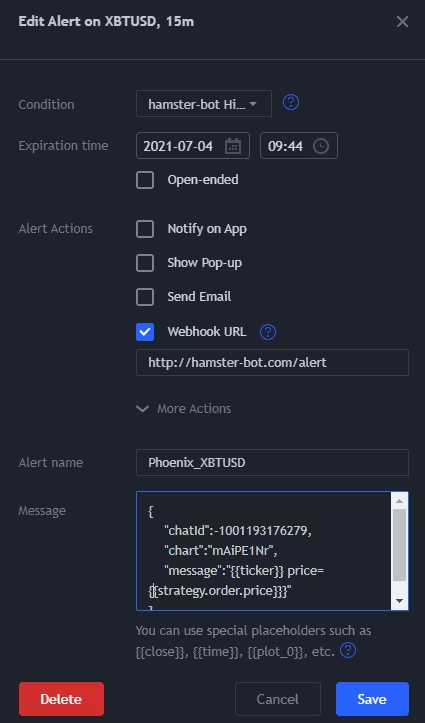
{"chatId":-1001208383003, "message":"YOUR_TEXT"}
- chatId - the Telegram chat id. You can get the id with the bot @fetch_id_bot
- (optional) YOUR_TOKEN - the token received after registering on the website or in the bot https://t.me/new_hamster_bot
- YOUR_TEXT - you can add variable values to the alert:
{-{exchange}-}:{-{ticker}-}, Price = {-{close}-}, Volume = {-{volume}-}
Custom bot:
Added the ability to use your own bot (with your own name and profile picture)- Create a bot in Telegram using @BotFather
- Get your bot's token. Example:
123456:ABC-DEF1234ghIkl-zyx57W2v1u123ew11 - Add your token to the alert text
Alert message format with a token:
{"chatId":-253996939, "message":"YOUR_TEXT","token":"YOUR_TELEGRAM_BOT_TOKEN"}
Chart screenshot:
Added the ability to send a message with a chart image- Go to your chart's page
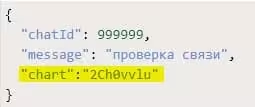
https://www.tradingview.com/chart/2Ch0vvlu— at the end of the link there is a set of random characters. Each chart has a unique link. In this example2Ch0vvluwould be the chart link - Enable sharing the chart via link
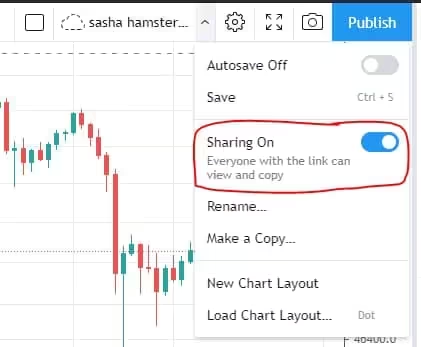
- Add the "chart" field to the alert message
Text formatting
You can format text using HTML tags.- Bold =>
<b>bold</b>,<strong>bold</strong> - Italic =>
<i>italic</i>,<em>italic</em> Code=><code>code</code>Strike=><s>strike</s>,<strike>strike</strike>,<del>strike</del>- Underline =>
<u>underline</u> - link here =>
<a href='https://hamster-bot.com/alert'>link here</a>
Other parameters
copy- a parameter to send the alert to several chats/channels at once. Example:"copy": [-153996939, -148926780]img- a parameter to send any image together with the alert. Example:"img": "http://hamster-bot.com/static/images/hb_logo_dark.avif"(you need to enter the image url)
NEW Trade any idea and any strategy
TradingView Strategy Alerts Webhook FREE
A new strategy. Trading by TradingView Alerts. I offer my own implementation of the connector. The main actions on a position: 1 Close position 2 Open position 3 Increase position 4 Partial close of position 5 Reverse position.