 hamster-bot
ZigZag, ZZ
The main idea of the strategy is to catch a strong trend move as early as possible and hold the position for the duration of the trend. A trade is opened when the price breaks levels built in advance from past price highs/lows.
It is based on logic similar to the ZigZag indicator:
● When the market starts to turn up, a local low is recorded
● When it turns down, a local high is recorded
These points become reference points. They form the levels the market has to break to confirm the move.
Reversible (flip long ↔ short)
The position is always open and flips from short to long and back. (Unless strategy modifiers are used - they are described below in the «Parameters and modifiers» block)
⚠️ The strategy produces losing trades when the market moves sideways and during V-shaped reversals.
Order type: Stop Market order (on some exchanges it may also be called a Conditional or Trigger order)
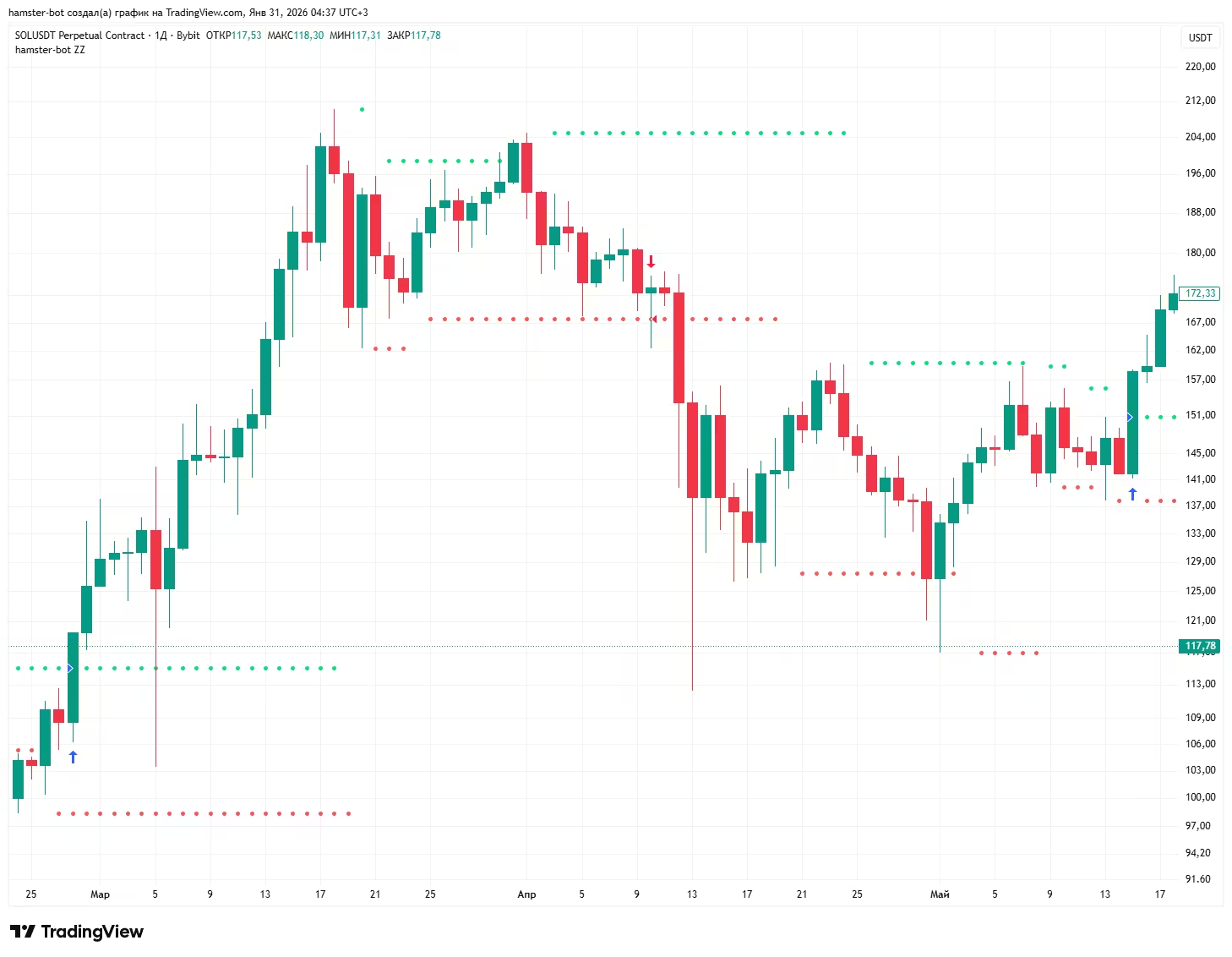
● Green marks where the conditional buy order is placed: a breakout of the last significant high.
● Red marks the sell order: the price breaks the last low.
After the strategy starts, if there is no position and the price is between the levels, 1 order to open a long position and 1 order to open a short are placed. If the price is not between the levels or there is an open position, 1 order is placed.
If a position is open, the strategy keeps only 1 order. By default its size = position size * 2, so that it flips the position (closes it and opens a new one of the same size).
Strategy Trend Zig Zag and ZZ - what is the difference
Strategy Trend Zig Zag (zigzag, selected by default when a bot is created) - a simple version with a minimum of settings, the counterpart of the «Simple trend strategy» script on TradingView.
Levels are built the same way as in ZZ2, and the position is flipped by stop orders. The modifiers and filters from the «Parameters and modifiers» block are not used in it.
length- reversal search depth (default 5)detection- length of the smoothing EMA (default 3)
ZZ (zz) - the full version: two level types (ZZ2 and ZZ6) and all the modifiers, filters and position size settings described below.
Level types: ZZ2 and ZZ6
ZZ2 (default) - levels are built from the reversal points of the smoothed price. The algorithm is explained in detail in the «For the curious» block.
depth - reversal search depth (default 5)
detection, detection_type, detection_source - length, type (EMA by default) and price source of the smoothing line whose reversals define the points
rsi_len, rsi_value - an additional RSI condition for a reversal point. Not used when rsi_value = 0
ZZ6 - levels are built from two high/low channels: a fast one of length zz6_len and a slow one of length zz6_len_slow (if not set, zz6_len * 3).
A level is fixed when the fast and slow channels coincide (the price made a new extreme) and the fast channel starts to turn.
In ZZ6 the position size depends on risk: the wider the distance between levels (and so the farther the stop), the smaller the lot.
zz6_risklong,zz6_riskshort- risk per trade in %. Lot = base lot * (risk % / distance between levels in %)zz6_risk_one- use the same risk for short as for long (zz6_risklong)zz6_risk_max- upper limit for this lot multiplier
Parameters and modifiers
Operating mode
reverse- reverse (counter-trend) mode. When the upper level is broken the bot opens a short, when the lower level is broken - a long. Orders in this mode are market ordersalways_in_position- if there is no position and the price has already moved beyond a level (for example after closing by stop or take profit), the bot enters immediately with a market order in the direction of the breakoutone_entry_long,one_entry_short- one entry per new level. If the position from a level has already been closed (for example by take profit or stop), the bot does not enter again on the same levelsingle_entry- strengthens the previous option: the ban on re-entry is lifted not by a new level but only after an entry in the opposite direction
Level settings
level_offset_long,level_offset_short- shift the level by a fixed price amountlevel_multiplier_long,level_multiplier_short- shift the level in percent. 1 - no shift, 1.01 - 1% higherangle_long,angle_short- level slope. The level is multiplied by this value on every new candle and gradually moves toward the price. 1 - a horizontal level
Entry filters
When a filter blocks an entry, the bot does not open a new position, but the order to close the current position at the opposite level stays in place.
use_distance_filter,distance_filter- do not enter if the distance between levels is greater than the given % (the stop is too far)use_flat_filter,flat_filter- do not enter if the distance between levels is less than the given % (a sign of a sideways market)use_narrowing- trade only when the levels are narrowing: the last high is lower than the previous one and the last low is higher than the previous oneuse_ma_filter,ma_filter- do not flip if the fast MA has already moved away from the slow MA by more than the given % against the new directionuse_ma_distance_filter,ma_distance_filter- do not enter if the fast and slow MAs are closer to each other than the given % (no momentum)ma_fast_*,ma_slow_*- type, length and source of the fast and slow MA for the two filters abovefilter_only_open- the distance filters apply only to opening a position; flipping from an already open position is allowed- Trend filter (the
filterblock, shared by ZZ and HiDeep) - see the «Position closing and common options» section
Position size
use_auto_risk- auto risk for ZZ2. The lot multiplier changes smoothly fromauto_risk_coeff_starttoauto_risk_coeff_enddepending on the distance between levels: fromauto_risk_procent_starttoauto_risk_procent_end%. A narrow channel means a bigger lot, a wide one a smaller lotcount_pnl_profit,count_pnl_loss- on a flip, add the profit or loss of the current position to the size of the new onesize_control- protection against doubling: if the position accidentally becomes larger than two entries, the excess is closed with a market order
Position closing
use_tp_between_levels,tp_between_levels_value- close the position in profit if the price has returned inside the channel between the levels and the profit is at least the given %stop_by_new_level- stop at a new level. If after entry the price broke a new level in the direction of the position and then came back to it, the position is closedclose_on_wrong_side- close the position if the price has gone beyond the opposite level by more than 1% (for example the stop order did not trigger because of a gap)use_close_on_levels_crossing- close the position if the levels have crossed (the upper one became lower than the lower one)from_level_price- calculate take profit and minimum profit from the level price instead of the actual entry price
Backtest
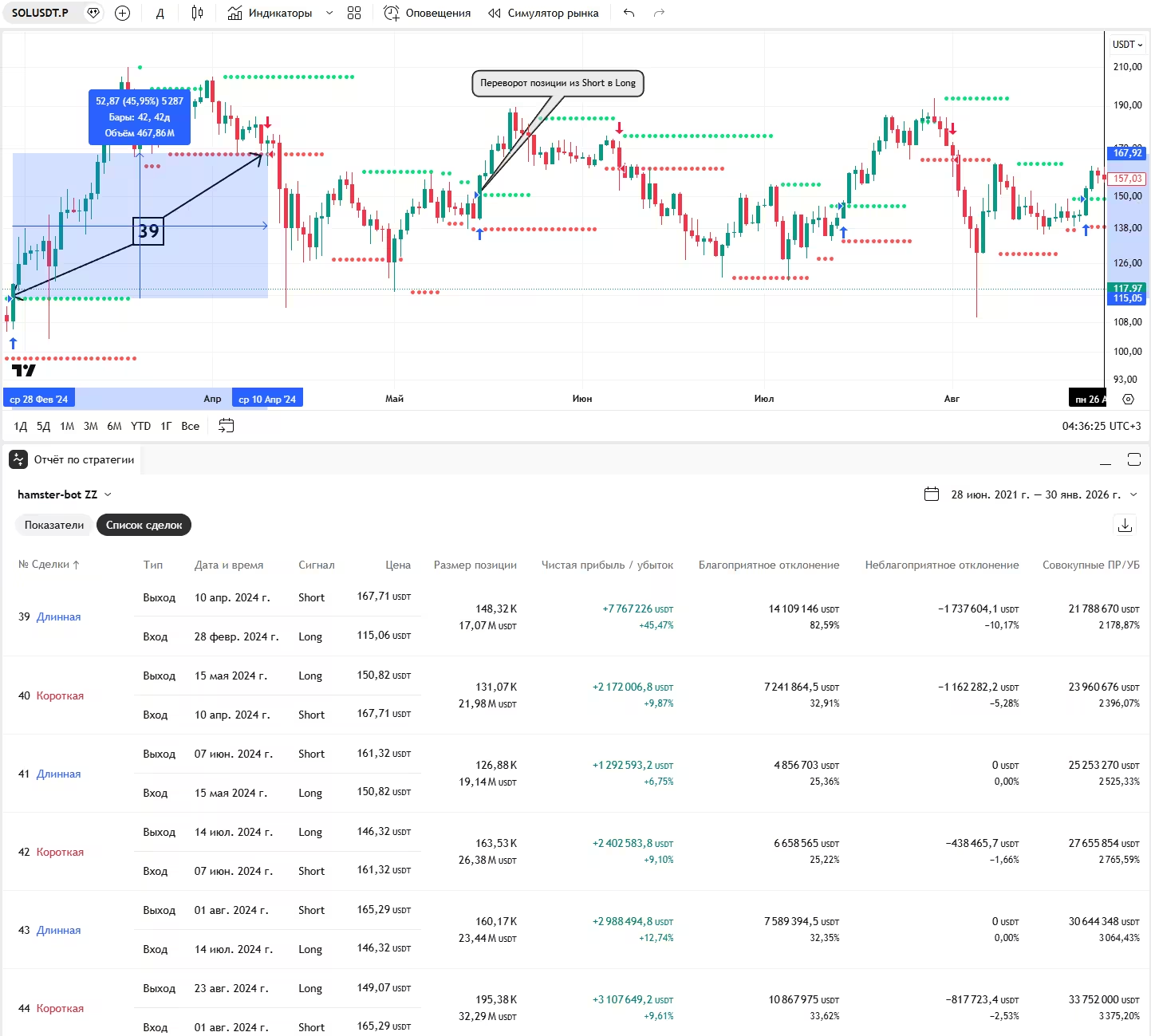
Test in the built-in backtester
A PineScript script for testing the strategy on historical data in the TradingView strategy tester:
Recommendations:
(not strict, you can break them for research purposes)
Working timeframe: 4h and higher.
For the curious
The level-building algorithm of the ZZ2 strategy. It does not use the standard ZigZag indicator. The code shows how simple it is and that repainting is ruled out. But the levels are built with a delay of a few candles (this does not hurt the strategy at all)

Three sequentially smoothed EMAs are used. This gives strong smoothing and reduces noise.
The variable z records reversal points. If the EMA turns up → a local low (l) is taken. If it turns down → a local high (h). These points (l and h) become the basis for building the levels.
Backtest the strategy on historical data in the tester and run it in hamster-bot.